| Category | SEO |
|---|---|
| Type | Doc |
| Last Modified | 6 May 2022 |
| Location | Assets (SEO) > ASSETS – Content > Topical Authority Content Map > Perfect Supps |
Perfect Supplements - Authoritative Content Strategy
Authoritative Content Strategy
Summary
From an SEO perspective, generating blog content can be helpful in building site authority and therefore increase overall rankings site-wide. In the case of Perfect Supplements, we suggest creating an informative anti-ageing pillar page that will answer frequently searched queries on Google. We have mapped out a few blog topics that are related to the pillar page topic, and there are a number of existing blogs on the Perfect Supplements website related to anti-ageing that we will interlink to.
Goal
The goal of this authoritative content strategy is to build content that will increase the authority of the site. Site authority is when Google sees a website as a trusted source on a topic and will use excerpts and other information from that site to answer user search queries. This authority is a major ranking factor for a site and can greatly increase page rank site wide.
We have built a strategy and generated a content plan and guidelines to increase the site’s authority by building structured and authoritative blog content.
Content Strategy
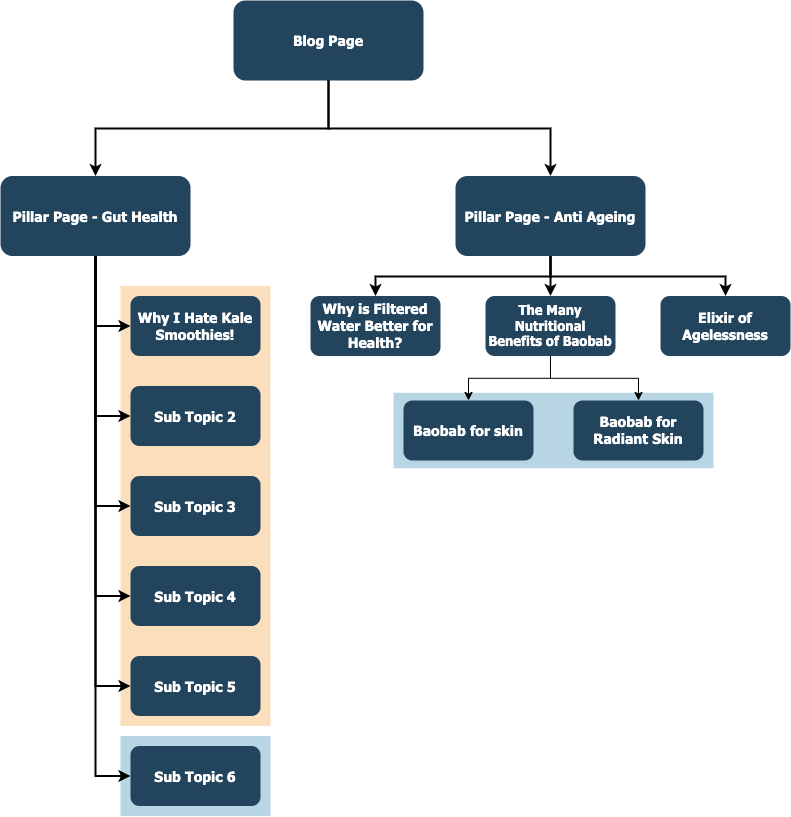
The content strategy has been developed around three aspects, pillar pages, sub topic pages and structured interlinking. The pillar page will link down to subtopic and blog pages, that will in turn either link further down to more specific subtopic pages or instead link back up to the pillar page.
First Step
Pillar Page
A pillar page will be the centre of the content strategy. The idea behind the pillar page is essentially to create a large blog page that encapsulates the entirety of a targeted topic. The pillar page will broadly cover the topic as a whole by addressing frequently asked questions/searches and other relevant information, which will then have links to more detailed information about the specific subtopic/question being covered. The page will be structured with a table of contents at the top that allows users to jump to the relevant information they are seeking on the page, and subheadings that indicate different subtopics. Interlinking will be performed within these subtopics to direct users to more in-depth information on the topic, as well as direct authority to where it needs to go.
Sub-topic/general blog pages
Additional pages will then be created to answer the questions in more depth. These pages will have more specific subtopics or general blog content relevant to the pillar page topic. For example, if ‘movies’ is the topic for your pillar page, ‘romance movies’ or ‘comedy movies’ would be subtopics that you could go into more depth about in separate blog articles.
URL/Site Structure
We need to ensure that the user and search engines can correctly navigate the site. We will look at how the current blog content is structured and make adjustments depending on URL structure and navigation. This one is important for Perfect Supplements as the URL structure is currently not optimised.
Second Step
Content Creation
Content will be created for the pillar and sub topic pages and will be done in such a way that it will appeal to both search engines and users. We will provide a set of guidelines for the content and the structure of the content to ensure that it is seen as authoritative.
Page Audit & Interlinking
After the content has been created and the pillar page and subpages are ready to be published, we will audit the pages and interlink anchor text to ensure that all pages pass authority correctly.
Content Map
Pillar Page
The Initial pillar page that will be targeted will be Anti-ageing
We have compiled a list of topic questions that need to be addressed in the page:
- What age should you start anti-ageing?
- How can I stop my face from ageing?
- What does anti-ageing mean?
- How do you treat anti-ageing?
- Benefits of anti-ageing treatments
- What makes you age faster?
- Can you reverse ageing?
- What are the first signs of ageing skin?
- What foods make you age faster?
This list isn’t definitive, and questions can be skipped, added, or reworded as need be. It is also recommended that if the client has any frequently asked questions around the topic that haven’t been covered in the list, that they are added.
For Perfect Supplements, the FAQ section of the site is very focused on ordering from the site - you could extend this section by adding more information about some of the more popular products.
Sub-topic/general blog pages
These are recommended subtopic pages and blog pages that will be interlinked from the pillar page.
- The best supplements for anti-ageing
- The most important vitamins in anti-ageing
- The benefits of collagen - uses and anti-ageing properties
Existing pages can also be added into the cluster. For example, the blog page ‘Why is Filtered Water Better for Health?’ could be added under the anti-ageing pillar page.
It will be important to add a table of contents to the top of the page, especially as the page gets longer, so that users can jump to a specific question and find specific information.
URL/Site Structure
The current blog URL structure is set up as /blogs/blog/article-name.
E.g. https://perfectsupplementsaustralia.com.au/blogs/blog/why-is-filtered-water-better-for-health
This structure is not considered optimal since the URL path does not show the user or the search engine what topic the blog is related to. The other obvious issue is the duplication of /blog/. This can confuse users and search engines and should be avoided.
A clear and optimal structure would be as follows:
https://perfectsupplementsaustralia.com.au/blogs/anti-ageing/why-is-filtered-water-better-for-health
Here are few examples of what different URL structures look like on the search page:

Or

Or

Or

We recommend building a hard URL structure and would recommend this URL path:
https://perfectsupplementsaustralia.com.au/blog/anti-ageing/why-is-filtered-water-better-for-health
Mapping Data and Analysis
The content data and information can be found here.
The content guidelines can be found here
Blogs
In addition to the pillar pages, you can keep working on blogs like you normally would. I have put together some ideas for blog topics that I have found by looking through competitor sites and rewording what they have. If something is relevant to a pillar page topic in the future, you will be able to add it to the pillar page and we will link it for you.
- Differences between collagen and gelatin
- Can collagen help decrease cellulite
- Can collagen help build muscle
- Does collagen help slow the ageing process
- How to choose the collagen supplement that is right for you
- What is collagen
- What is hydrolysed collagen
- Is beef liver good for you
- Is collagen safe for breastfeeding
- Does collagen reduce stretch marks
- You could do some recipes
- A guide to adaptogens - what are they and what are they used for
- Do adaptogens help soothe anxiety
- Tips for improving bone health
- Can you rebuild bone density
You can also use any of the other topics found here - Topical Authority Content Mapping under the Google Data Brainstorm tab.
Recommendations
To summarise, our recommendation would be to build out a pillar page for each main blog topic category we have found and any extra ones you would like to add. Within the pillar page of each topic, you will need to answer specific questions relating to that topic in snippets, and then expand on those topics in blog articles. We will then come in and perform interlinking, which will direct the authority to the pillar page. The goal of this structure is to build content that will increase the authority of the overall site.
While this will be the structure for specific topics or blog articles, you should continue writing blog articles on topics that you think your clients will find interesting and engage with - even if these articles do not relate to any of your pillar topics necessarily. This can be done by adding an ‘all blogs’ section under where the categories are listed.