Open the copy of “TEMPLATE | Tech Audit | MONTH 2025” → Rename the copy with the format “calibrenine.com.au | Tech Audit | JAN 2025”
Move the sheet to the client’s tech folder. It should be located at Client Contracts → Client’s Folded → 2025 → Tech
Open up Google Drive → Client Proposals → Client folder → Keyword Analysis Template
Start a Screaming Frog crawl of the website. It will not be required until the final section of the Audit, but it’s good practice to start the crawl as early as possible. For large ecommerce sites the crawl may take several hours.
CAMPAIGN CONFIGURATION
Fill out Agent Name, Website, CMS, Initiated Date, Account Manager, and Asana Campaign Link
NOTE: Asana links are only for retainer clients. Do not create one for one-off projects.
Campaign Configuration – Check if you have access to the following. Use Wappalyzer and/or TagHound to check which software the site uses if needed.
CMS Permissions: Do I have enough access to the client’s website? It is particularly important that we can change their metadata, implement redirects, implement content changes and (ideally) access the HTML
Wordpress: Search for the client’s name in your 1Password vault. Logins will usually be with the tech@calibrenine.com.au email address.
Google Analytics 4 (GA4): Go to https://analytics.google.com/ → Check for the client’s property in each of our three accounts:
calibrenine.webmaster@gmail.com
analytics@calibrenine.com.au
google.analytics@calibrenine.com.au
Google Tag Manager (GTM): Settings → Data streams → website → view tag instructions
Google My Business (GMB): *mostly a concern for the Content/Sales Team
Semrush/Ahrefs: Has a ‘Project’ been created for the client? You want to check
Organic Research
Backlink Analysis
SEO Audit
KEYWORD ANALYSIS
Copy the keywords from the client’s Keyword Analysis Template, and paste them onto the allotted area in the Keyword Analysis tab of the Campaign Sheet.
SITEMAP
You want to leave records of how the client’s website was before we start working on it.
Head to Screaming Frog → Internal → HTML → export → copy and paste to Sitemap tab.
Make sure to copy and paste the headings to ensure it is in the correct order.
NOTE: Use CMND/Ctrl + Shift + V to paste without formatting. It’s very useful for pasting lists.
LINK AUDIT
You want to leave records of the client’s backlinks before we start working on it.
Head to Semrush → Backlink Analytics → Backlinks → export → copy and paste to the Link Audit tab.
Make sure to copy and paste the headings to ensure it is in the correct order.
AUDIT
OFF-PAGE AUDIT
SERPs
Ranking for Brand Name
How To Check:
Check branded SERPs to ensure the site is indexed, and to see if they are competing with any similarly named businesses.
Ensure that you use incognito mode (if using Chrome) so that the results are not affected by your Chrome User Profile.
Description:
In some extreme cases, the intent of the SERPs will be mixed. For example “My Oh My” is a Cafe in Richmond, an eatery in Brendale, and a Kylie Minogue music video featuring Bebe Rexha & Tove Lo.
There is often very little we can do directly to outrank Kylie Minogue, but it may change the focus of the campaign. In this case, the food establishments may choose to focus more on Google Maps (Google Business) and local SERPs where Kylie can’t compete because they are closer, have an open physical location, and more closely match the intent of hungry users.
Social Profiles (SERPs)
How To Check:
Check what social profiles the business has.
Description:
Later on in the audit, we will ensure that they have linked to all of their social profiles in their Google Business Account, and on their Website.
Smaller owner-operator businesses may appreciate advice on which social media platforms are most likely to reach their target audience.
SEO is far more effective if the brand is active on multiple channels.
→ Set the comparison date to Previous 3 months or Previous 6 months. Sort by negative Change in Traffic. Check to see if any previously ranking/high traffic pages are now missing (404).
Description:
It is very common for ecommerce sites to remove old/out of stock product pages without redirecting them.
Discontinued products should be redirected. Redirections can be to a very similar/updated product, or to the product’s category page.
Out of stock products should have their page left up. Ideally indicate to the user that it is out of stock, and provide a link to be notified when it is back.
Another common cause of 404 pages is a botched site migration. Talk to the tech team immediately in this situation, widespread URL changes with no redirects can kill a site’s SEO campaign.
During Tech Fixes, we can redirect missing pages to similar pages on the site in an attempt to save and pass on the page’s authority. We are attempting to tell Google “this is the new version of that page” and that it should share any positive ranking signals that the previous page had (backlinks/user engagement etc.).
The more quickly we redirect a missing page, the more likely we are to successfully save the page’s authority.
Smaller/more niche sites are crawled by Google less often, so 404s can be saved for longer.
Estimate the percentage of anchors that are branded vs non-branded anchor text.
This is a good way of telling whether a business has been engaging in low-quality link-building (which would put them at risk of a ranking penalty.)
A good link profile will contain mostly links like “Calibre9” and “www.calibrenine.com.au” from local business directories, local/relevant news sources, and other local/relevant businesses.
A bad profile will contain mostly links like “Best SEO Melbourne”, “Buy Backlinks Online”, “Cheapest SEO Collingwood”. You can click on these links, and often they will be embedded poorly into AI-generated blog posts on shitty “news” sites that no one has ever heard of.
Note: there is a difference between a "bad" anchor and a non-descriptive anchor:
Example of bad: "Cheapest SEO Collingwood" - it is an artificially created anchor to target long-tail keywords.
Example of Non-Descriptive: "here" or "website" (this is not ideal, but it is also unlikely to be bad link-building).
Google monitors domains to see if they have had an unnaturally large jump in spammy/non-branded anchors between crawls. This puts you at risk of a ranking penalty.
Poor backlinks can be “disavowed” in Search Console. We usually try to avoid doing so because there is a high risk of doing more harm than good to the client’s backlink profile. Google will usually just ignore useless and off-topic backlinks so disavowing is unnecessary. In rare cases where there is clear spammy high-volume link building, disavowing can however be a very useful tool.
In rare cases, a competitor will attempt to get your domain penalised by creating large amounts of spammy backlinks linking to it. This is known as “Negative SEO”. In order for a backlink to be damaging, it must be relevant to the content of your site. Any off-topic links featuring anchors related to gambling or adult entertainment will be ignored by Google.
Negative SEO is most common in competitive (and sketchy) industries like security, tobacco, gambling and medical marijuana.
Make note of any flagged pages, and which URL the link goes to on our site.
Make note of why it was flagged - they may be a news source that accepts paid articles, or a domain that backlinks are being publicly sold on (higher risk!)
This site is just another way to find if the client has been doing poor-quality link building.
Missed Backlinks
How To Check:
Search for the business using this format:
calibre9 -site:calibrenine.com.au
Description:
This searches for brand mentions that are not on your domain.
It’s a good way to find articles/mentions of your brand where they have not provided a backlink.
An easy way to build local backlinks and authority is to reach out to the brand’s partners/clients who have already mentioned them, and politely request that they add a backlink as well.
It may be helpful to tell them you will make a post about their business as well.
Some agencies have a large focus on this kind of “Digital PR” along with negotiating partnerships and promotions between businesses that benefit them both.
Look at the browser tab on the client’s site and ensure that they have a favicon.
Check that the favicon also appears in the SERPs.
Description:
Favicons can usually be made quite easily by downloading their logo and deleting the background in Canva.
Functioning 404 Page
How To Check:
Type in a bad URL slug on your site (eg. calibrenine.com.au/complete-nonsense) and have a look at the site’s 404 page.
Description:
A good 404 page should tell the user clearly tell the user that the page could not be found, and provide them a clear link back to the rest of the site.
It should also keep the site header and footer, so that the user can use those to navigate as well.
Other optional features that can increase user engagement are funny gifs/animations, and carousels of suggested products or blogs.
→ make note of any other sites that have plagiarised content from our site.
Description:
Identical products being sold by different retailers often have the same manufacturer description. This is not a big issue (although in a perfect world, our site would provide additional information and images of the products, beyond what the competitors have)
Some clients and web developers copy-paste service content directly from similar competitor sites. Some clients have also “written” blogs by copy-pasting their favourite industry news. This is plagiarism - it is against Google’s TOS and Australian Copyright Law (not sure why we have to tell people this).
If it is our original copy that has been cruelly replicated by a jealous competitor with weak branding and no rizz, then we need to contact them with a removal notice and file for a copyright takedown with Google. https://support.google.com/legal/troubleshooter/
→ Make note of any duplicate or largely duplicate pages.
Description:
Exact duplicate pages should either be canonicalised or removed from the site.
Sometimes clients include large amounts of service or “about us” copy in their footer, and duplicate it on every page. This can confuse page targeting and cause content cannibalisation.
If you are unsure, I recommend doing a Content Cannibalisation Audit using our new tool - ask Chris (sorry Chris).
Content cannibalisation occurs when two pages are too close in their content and targeting. It is damaging for SEO, because Google’s algorithm becomes unsure which pages to serve to users for queries that both pages are relevant to. It usually ends up serving both pages to different users at different times (based on the exact query/user location/time of day etc.). This causes the pages to split ranking signals (including user engagement) and causes both pages to rank lower than they otherwise would.
Content cannibalisation is why plagiarism is bad for SEO - it can cause both pages to rank more poorly even when your content was indexed earlier. The “content cannibalisation” we usually refer to on our client’s sites is “self-plagiarism”.
UX
Mobile Responsiveness
Use the Chrome Inspect Tool(CMND/Ctrl + Shift + C)
→ Click the screen icon in the top-left of the Dev tools.
→ Test the site on a range of desktop and mobile screen widths (Use the Dimensions dropdown to change screen size).
A poorly implemented interstitial (pop-up) may cause Google’s Crawlers to be unable to read your site’s content. You can check this using the rich results test https://search.google.com/test/rich-results (View Tested Page → Screenshot/HTML)
Ensure pop-ups are not disabled on your browser by an adblocker or any other extension.
Font Readability
How To Check:
Look at the fonts used across the site (particularly on target pages).
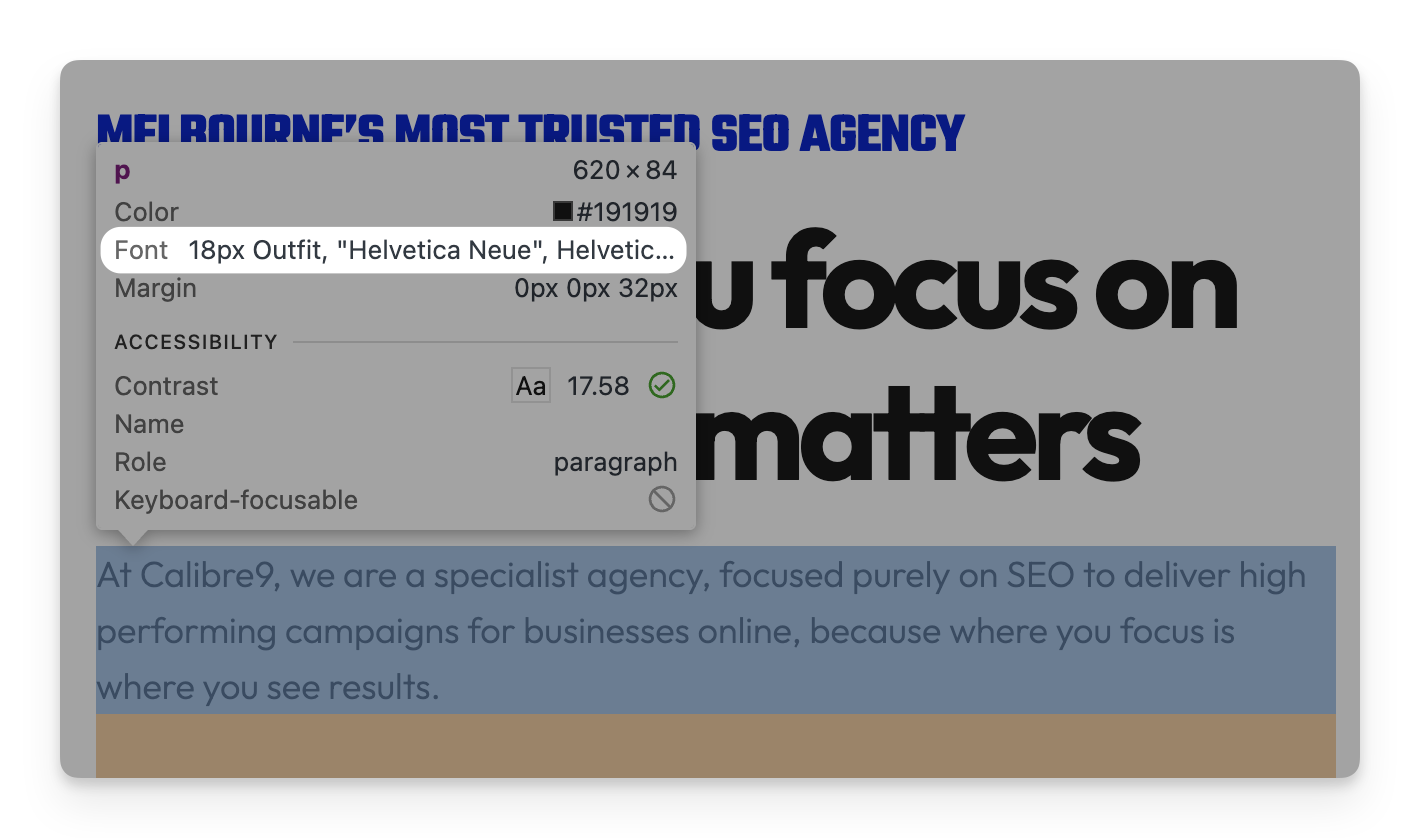
We recommend sans-serif fonts with high color contrast and proper spacing that are at least 16px (Use the Chrome Inspect Tool to check - CMND/Ctrl + Shift + C).
Description:
Some clients may also not understand that some classic typefaces (Such as papyrus, comic sans, ariel and times new roman) are overused and may make the brand seem dated or unprofessional.
Font readability is far more important for some sites than others - sites that cater to seniors or second-language users should place more importance on font, and so should sites that are very text-heavy (like niche B2B services).
Colour Contrast
How To Check:
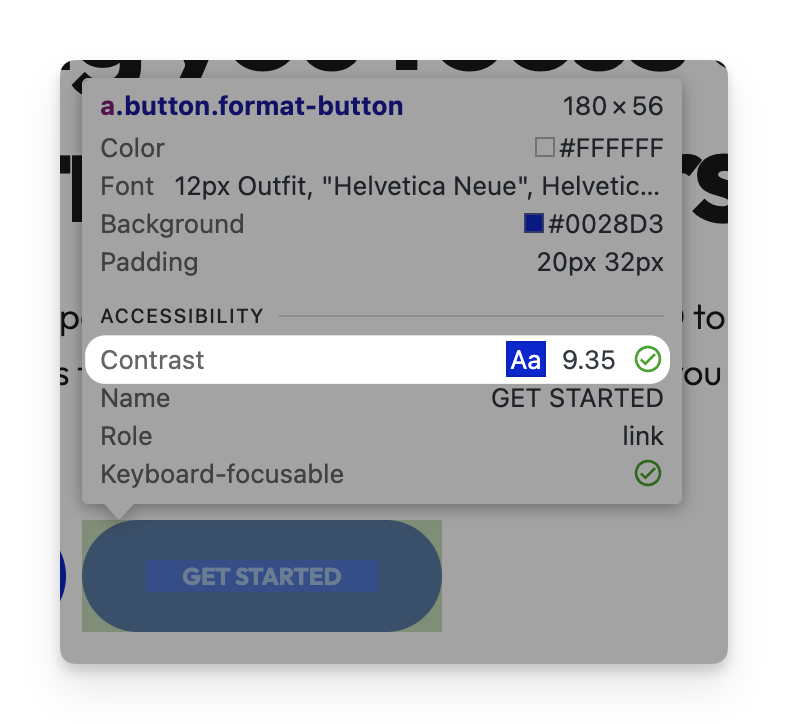
Use the inspect tool to hover over the element. You should see the contrast ratio. We want it to have a contrast ratio of at least 4.5:1 to pass to make sure the element/text is readable.
Look at the color contrast, ensure that the site’s most important elements (such as headings, USPs, CTAs and navigation elements) are easy to see.
Ideally, they also give feedback to the user when hovered/interacted with.
Some examples include buttons that change colour when hovered, and hero images with a brand message that moves while the user scrolls (parallax shift).
Header
Logo with Homepage link
How To Check:
Click on the logo. It should take you to the homepage.
Description:
Users expect it to - and we deliver the goods.
Important Links in Header
How To Check:
Make sure all of the target service pages and category pages are featured prominently in the header.
Description:
The sites navigation should be organised in a way that meets the intent of the most users (put the most popular products/services first)
Some clients may also need advice on constructing new product categories or service pages. This is usually prompted by keyword research (and identifying an opportunity in the market or a gap in our site).
Search Bar
How To Check:
Use the site’s internal search, and make sure it functions correctly.
Description:
Small service-based businesses do not require an internal site search.
Large ecommerce clients will miss conversions if they don’t have a site search - a site with a lot of products will inevitably make navigation more complex, and some users will give up without a search feature.
Double check that the search feature actually works - some sites are surprisingly poor at parsing their own content (if I ever find the guy who coded Shopify's default search feature, I'll put papercuts between his toes).
Homepage (Above the Fold)
Above the Fold CTA
How To Check:
Ensure that the homepage has a call to action (CTA) that you can see without scrolling (above the fold).
Description:
Every business should have one. For service businesses it should be something like “Contact us today” or “Get started online now”. For ecommerce businesses, it’s often “Shop Now”, but I like to use a hero product or category (“Lunar New Year Collection” or “Shop pure cashmere sweaters”).
Clear Brand Offer / Message
The business should make it clear who they are and what they do.
On the Calibre9 Site, we have “Melbourne’s Most Trusted SEO Agency” along with brand messaging like “we are a specialist agency, focused purely on SEO” and “Helping you focus on what truly matters”. This makes it clear to users that we are a specialised marketing agency that focuses purely on SEO.
Banner Image
A website should feature a captivating visual element that loads when a user first visits. Most sites will use an image featuring their product(s) or service.
For some sites, particularly service-based businesses (like lawyers, doctors or SaaS) an image of the service makes less sense. They could instead use a picture of their team/office, or a more metaphorical image (a cheetah for fast internet, a camera lens for focused marketing)
We want a user to stay engaged with the site for at least 10 seconds to signal to Google that the content is useful and meets the searcher’s needs.
Interactive hero elements can be a great way to trick the user into staying engaged temporarily (primates love toys).
Below-The-Fold
Feature Snapshot (Value Proposition, USP)
A feature snapshot summarises and highlights the unique features of the products or service. It acts as a quick summary of the value proposition you are making to the user.
Feature snapshots are far more engaging when they feature icons or pictograms to represent the features.
On the Koko Black website, their USPs are: “Support Sustainability”, “100% Natural”, “Giving Back” and “Proudly Australian”. A user on this site knows they are buying ethical, sustainably sourced chocolate from an Australian business - which is likely to affect how they feel about the products. Each point also comes with a short description and an icon/pictogram to represent it.
Priority Product Categories (+ featured products)
Ecommerce sites should have a selection of their new and best selling products and their product categories on display underneath the homepage hero. Service based businesses can list their available services instead (with short descriptions and clear links to service pages).
For most sites, product categories are the highest engagement and should be higher on the page.
For some sites that feature very few products, or make the majority of their sales on a few items, a “Best selling products” carousel is more engaging to users and should be first instead.
A site’s homepage should attempt to meet the most common need of the users first - whether that is to browse a popular category or see the product that a brand is known for.
Social Proof (Testimonials, As Seen In, Trusted By, etc.)
Social proof (usually presented as a carousel of Google Business or recent product reviews) is one of the most powerful ways to influence users to trust your site. Users implicitly trust reviews from others more than the information on your site (even though you are hosting/curating the reviews).
For service-based businesses, I like to see this displayed high on the page, directly under the hero and USP.
For ecommerce businesses, I favour a carousel of recent product reviews underneath or in between the product carousels/product categories.
About Section / Informational Content
Users who have scrolled past the products/services on offer, are usually looking to find out more about your brand. You can meet this need by providing a section giving further information about the brand, its founders, its values or its history.
This section should contain a link to the full About page which has more detailed information.
Frequently Asked Questions
Users may also be seeking information on how the products or services are used and delivered. This can be easily addressed with an FaQ section.
FaQs are a great way to include additional keywords and interlinking on the page while still making useful content for users.
FaQ questions can be found through keyword research or by talking to the client - they usually know which questions they receive most often.
Blog Showcase
If a user is still engaged with the site, they might be interested in the news or industry-related content that you’ve been posting. I recommend using a carousel of the most recent posts.
This is a great way to keep your homepage content feeling fresh and up-to-date.
It can help to interlink important pillar content that you are using to boost the site’s topical authority.
Broken/Poor Styling (Homepage)
This is a catch-all for any bugs or styling issues that you find while using the homepage. The also includes lorem ipsum or any other placeholder text that you find.
Footer
Email Address & Contact Phone in Footer
The business should include their contact phone and email address in the site footer.
It is very important that the contact information matches the one listed in their Google Business profile. Mismatched contact information puts the business profile at a much higher risk of being suspended.
Business Address in Footer
If the site does business in person, they should include their address(s) in the footer. Remote businesses should include their mailing address if possible.
It is very important that the address matches the one listed in their Google Business profile. Mismatched contact information puts the business profile at a much higher risk of being suspended.
Important Links in Footer
The footer should also include links to key pages (such as the contact page) to assist users who have scrolled all the way to the bottom of the page.
The footer also usually includes any relevant legal information such as disclaimers or privacy policies.
I recommend including a CTA or a contact form in the footer as well.
Social Media Links
The site should have a link to their social media profiles in the header or footer.
Providing a link to your social media profiles is a great way to interlink the properties that you have on different platforms.
The goal of doing so is to help Google understand the brand as a single entity that exists across multiple platforms and include it in their knowledge graph (https://support.google.com/knowledgepanel/).
For brands like fashion labels and photographers that have a large social media presence, I recommend including the links in the header instead of the footer.
In-date Copyright
The site’s copyright notice should be in-date.
Out of date copyright notices make the site look old and poorly maintained. Very minor issue but it should be fixed.
About Page
Company Overview + Brand Story + Mission & Values
Check that the site has an About page that provides adequate context about the brand and their values. I recommend including a concise and engaging summary of the brand's story, purpose and goals.
Many users will not trust a site with their money unless they know who’s behind it.
Some sites (particularly small ones) will only have their “About Us” content on the home page. This is fine, so long as there is enough information for the business to come across as real, trustworthy and (hopefully) likable.
High quality “About Us” content can demonstrate industry experience, which is a key factor in Google’s Page Quality Rating Guidelines.
Check that the site also includes bios and photos for team members.
A small business can have a bio for every employee, a larger one might just have images and information about the leadership team and/or founders.
Good for increasing user trust, and helping them to feel more comfortable contacting you.
If the business has a staff of established professionals, this can be a great place to link to their LinkedIn profiles (further demonstrating experience and expertise)
Original Pictures
Check that the site has original images of the business, team or founders (preferably all of them).
Original images of real people, locations and products will greatly increase trust in the brand.
Broken/Poor Styling (About Page)
This is a catch-all for any bugs or styling issues that you find while using the about page.
Contact Page
Functional Contact Form
Test that the contact form works by filling one out (make sure to be clear in the form that this is a test submission).
Make sure that the contact form gives proper feedback to the user when completed, so that they know the submission was successful.
The site should say something like “Thank you for your enquiry, we’ll be in touch!”
Ideally, the site will also send an email receipt to the user.
For submission forms that are directly on the site (not an external service that has been embedded) you can check if the contact form was successfully submitted by the user’s browser. To do this, have the Chrome Dev Tools (CMND/Ctrl + Shift + C) open to the Network tab while you are submitting the form. Check to see if a POST request matching the contact form has been sent.
We can only tell if a contact form has been correctly sent client-side. Without further access we cannot confirm that the information sent by the browser was correctly stored and that the client was properly notified.
Business Address (Contact Page)
If the site does business in person, they should include their address(s) on the contact page. Remote businesses should include their mailing address if possible.
It is very important that the address matches the one listed in their Google Business profile. Mismatched contact information puts the business profile at a much higher risk of being suspended.
Business Email and Phone Number (Contact Page)
The business should include their contact phone and email address on the contact page.
It is very important that the contact information matches the one listed in their Google Business profile. Mismatched contact information puts the business profile at a much higher risk of being suspended.
Some sites and businesses will only accept one contact method. Where possible, we encourage them to expand to suit the diverse needs of users.
Younger users tend to prefer online contact and booking forms, whereas more senior users often prefer calling or emailing. The importance of each contact method will vary by industry.
Opening Hours
If the site does business in person, they should include their opening hours on the contact page.
It is very important that the opening hours match the ones listed in their Google Business profile. Mismatched opening information puts the business profile at a very high risk of being suspended.
Opening hours are the most important information to get correct (for SEO). Businesses used to “cheat” higher rankings in local SERPs by listing themselves as open 24 hours. As a result, Google is much more vigilant in suspending business profiles with inaccurate opening hours.
Link to FaQ Page
This is a UX feature only. I like to recommend to clients that they put FaQs or a link to the FaQs on their contact page.
It assists users by answering common questions immediately, and it helps the client by cutting down on unneeded inquiries.
Some businesses (particularly those in more complex product niches like SaaS) have found success in training LLMs on libraries of their documentation, and allowing site users to ask it questions.
Users are very unlikely to spend money on a product or service that they do not understand.
Embedded Google Map
If the brand conducts business in person, ensure that they have a map to show the location visually.
Google Maps is my preferred map embedding, because it serves as an easy way to interlink the site and the Google Business profile.
Australian Business Number (ABN)
ABNs are an easy way to prove that the site is associated with a legitimate business. I recommend having one either on the contact page or in the site footer.
Broken/Poor Styling (Contact Page)
This is a catch-all for any bugs or styling issues that you find while using the contact page.
Blog/Article Pages
Images with alt text (Article Pages)
How To Check:
Inspect the hero and article images with the Chrome Dev Tools (CMND/Ctrl + Shift + C)
→ Ensure that they have accurate and descriptive alt text.
Description:
Google uses alt text to help them understand the contents and context of images.
Alt text is also used by screen readers to help visually impaired people browse the site. If your brand conducts business in the United States, you are required to provide alt text on important images by the Americans with Disabilities Act (ADA), 1990.
Author Attribution
Ensure that articles on the site are attributed to a specific author who has experience or expertise in the area.
If the business is small/inexperienced, I recommend attributing blogs to the owner.
If the author is particularly influential or well-known within the industry, attribution can directly assist SEO. In general however, it’s great for user trust to feel like they're reading a real article written by a real person who cares about the topic.
These are different from the default WordPress author pages that we recommend removing in the Author pages in sitemapissue.
Internal Linking
Check if the brand has done any previous interlinking between their blog/article copy and key conversion pages.
This check exists partially to identify opportunities for future interlinking - many sites have a lot of high-quality informational content that could be contributing more authority to target pages.
This check also exists to ensure that we do not over-optimise the site. Some sites who’ve had previous SEO work will come onboard with a large number of low-quality blog posts featuring dense and spammy interlinking. We should be aware of this before we add any interlinks of our own.
Do not attempt to review all interlinking site-wide in this audit item. Full interlinking reviews are time-consuming and should be scheduled separately (After concerns are raised in audit items like this one)
It is worth noting that the value of a link changes based on where it is placed on a page. For example, links in the body text that have bigger and higher contrast anchors will pass more authority than a small low-contrast link in the footer.
This behaviour is due to Google’s Reasonable Surfer Model (which augments the original core PageRank system). See Bill Slawski’s analysis here:
Service pages should have a visually prominent above-the-fold call to action(CTA).
Images (Service Pages)
Service pages should feature original images of the service being performed (where possible).
Businesses where photos make less sense (like SaaS) should still incorporate visual elements like tables, diagrams and infographics.
High-quality visual content greatly increases the engagement rate of a page.
Service Page Content
Service pages should feature original copy that is accurate and engaging.
This is of very high importance; the style, the clarity and the value proposition presented by service content has a very high impact on the conversion rate of the site.
Customers will not pay for a service they don’t understand.
Social Proof (Service Pages)
A service page should have some form of social proof.
Social proof is one of the most powerful ways to influence user decision making.
Some useful forms of social proof include Google Reviews carousels, testimonials, quotes and brand partners.
Broken / Poor Styling (Service Pages)
This is a catch-all for any bugs or styling issues that you find while using the service pages.
Collection Pages
Collection Page Copy
Check that the collection pages have informational content which provides additional context on the products and addresses common questions/concerns.
Collection page content is a simple and effective way to enhance the topical authority of the page.
Collection page content can also be easily interlinked to key/target products.
Historically, collection pages were the best ranking page type in Google (for ecommerce). Recent updates have shifted towards favouring product pages more, but collection pages still tend to be some of the highest traffic and engagement pages on the site.
Collection pages are at far higher risk of content cannibalisation than other page types - brands often create large numbers of very similar collections.
Product Price
Items listed on collection pages should have their prices clearly displayed where possible.
I also recommend that discounts and promotions are clearly marked on the collection pages, along with out of stock products (which should be placed last, but still present).
Product Images (Quality and Uniformity)
Products on the collections page should have clear, original, uniform and high-quality images.
Low quality product images are very damaging to user engagement and conversion rate.
Some sites increase engagement on category pages by displaying a second product image or zooming in when the item is hovered.
Sold Out Products
Out of stock products that will return should be displayed on category pages.
Sites often damage their site structure and authority by removing pages or links for out of stock products.
Designating products as "sold out" makes it clear to users what has occurred, and provides an easy way to sign them up to mailing lists (so they can be notified when the product is back).
Filter & Sort Pages
Some sites use unique URLs for filtered versions of category pages. Ensure that they are not indexable.
Category or blog tag pages usually have duplicate content with an actual category on the site, and can lead to content cannibalisation.
This issue can be fixed by either blocking unneeded pages from being crawled in the robots.txt, or by placing a noindex tag in the header of those pages.
Broken / Poor Styling (Collection Pages)
This is a catch-all for any bugs or styling issues that you find while using the category pages.
Product Pages (Ecommerce Only)
Product Name Above the Fold
The product’s name should be displayed prominently in a clear, large font above the fold.
Product Price Above the Fold
The product’s price should be displayed prominently in a clear, large font above the fold.
Image Above the Fold
A clear and full image of the product should be displayed above the fold.
Make sure that the product name, price and image are still above the fold at mobile screen widths.
For Google Merchant Center (and in general), it is recommended that products have 5-6 images.
The first image should be a clear, full image of the product. The other images can be more heavily styled or feature the product in use or in a range of contexts (different environments, different models, different colours etc.).
Product Description (Dot Points) + care, sizing chart, relevant links, etc.
The product should have a clear and accurate description that includes all information relevant to the purchasing decision.
I recommend using a dot point format to keep the information clear and structured so it can more easily be read by users, Google and LLMs/AI powered engines.
This is of very high importance; the style, the clarity and the positioning presented by the product description and image has a very high impact on the conversion rate of the product, and the organic performance of the page.
We recommend including relevant resources or information such as features, specifications, dimensions, weight, materials, product FaQs, guides and warranties.
Customers will be reluctant to pay for a product if they are unsure that it will fit their needs.
Functional Cart/Purchase Method
How To Check:
Add multiple items to your cart.
→ Try to remove some of them.
→ Try to change the item quantity in the cart.
→ Try to check them out (without putting payment in).
Description:
Issues with cart functionality are a surprisingly common cause of lost conversions.
Users are much less likely to trust an unreliable site with their payment information.
Customer Reviews
Ecommerce sites should collect customer reviews on their product pages.
Customer reviews are very powerful - reading a review from someone who successfully used the product to meet the same need you are experiencing is highly influential.
Broken/Poor Styling (Product Pages)
This is a catch-all for any bugs or styling issues that you find while using the product pages.
Pass = Wordpress, Shopify, Squarespace, Wix, Webflow (Or any other common commercially available CMSs with SEO features)
Warning (High) = Custom CMS
The more custom and obscure a CMS is, the more difficult our job is. On some CMSs, we cannot implement at all. It is important that the customer is warned early on in the process that their CMS may hinder the campaign to avoid mismatched expectations.
To install analytics, we either need access to the site’s HTML or the CMS must have in-built integration.
To implement metadata, we either need access to the site’s HTML or the CMS must have in-built integration.
To implement content/styling changes, we either need access to the site’s full HTML, or to their page builder.
Sites in unfamiliar CMSs and/or without WYSIWYG editors are very time consuming to work on, and changes can often be completed more quickly by the original developer.
To implement redirects, the CMS must have a native tool, or we will need access to their htaccess file.
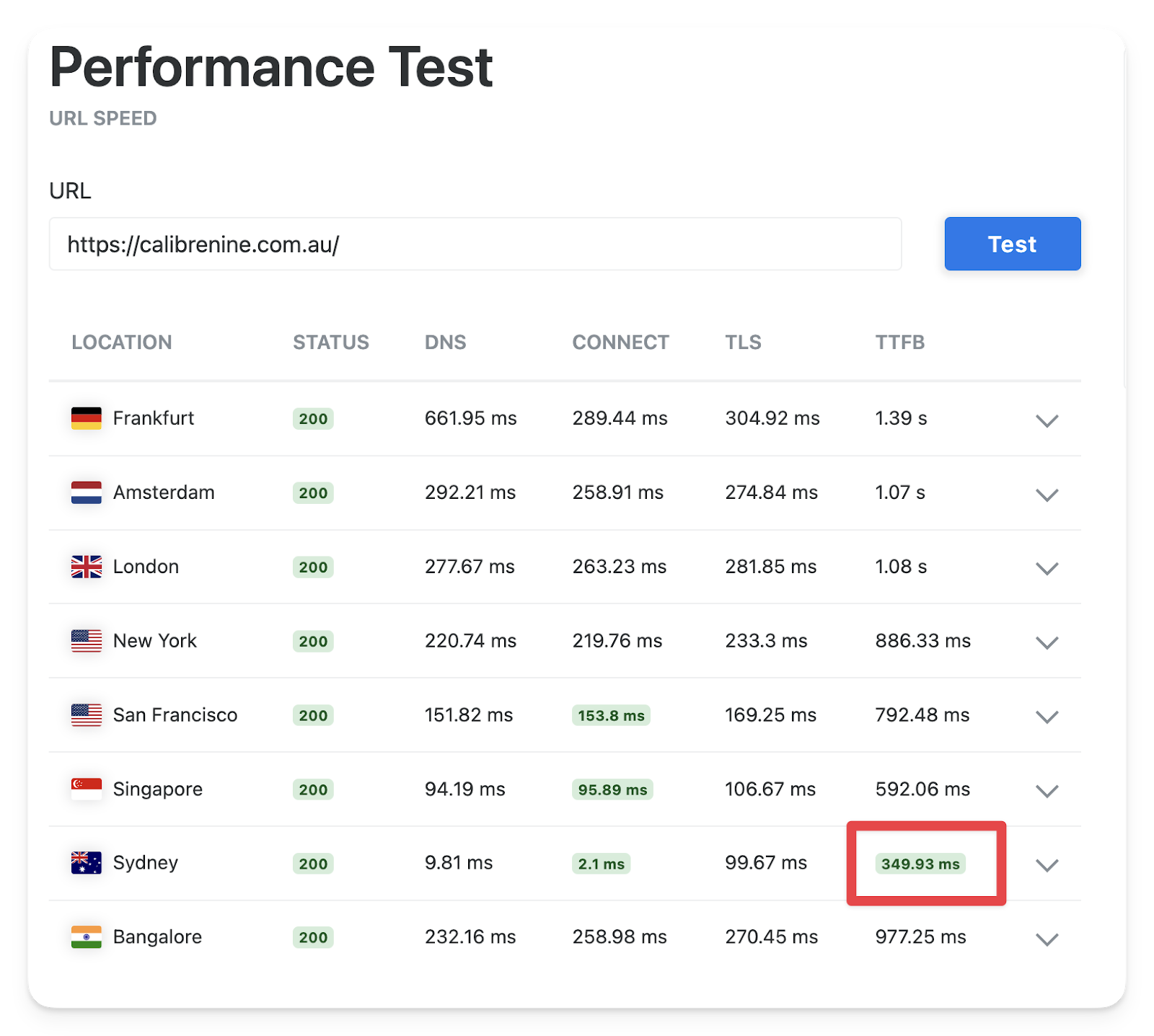
→ ensure that the ping is lower in the region where they conduct business.
Usually, the location with the fastest connection time and time to first byte (TTFB) is where the server is located.
Server location is the most important factor for site speed, and it almost solely responsible for the site’s time to first byte (TTFB) which is measured by Google’s PageSpeed Metrics (https://pagespeed.web.dev/)
Server migrations are usually performed by the client’s web developer when required.
We should crawl the old site beforehand to make sure they don’t fuck it up.
In this example, we can tell that the Calibre9 site is hosted in Australia, because it loads significantly faster from Sydney:
→ View several of the historical crawls to see how old the domain is, and if it has always hosted the same site.
If the domain is new, it will take longer to see results from an SEO campaign. The reason is that Google bases their indexing on a number of historical crawls of the site (10). If the domain is brand new, it may take a while to accumulate enough crawls. This is a particular issue if the site is niche or low traffic.
If the domain has hosted a site with a different topic in the past, it will also take longer to see the results of a campaign. This is for similar reasons; Google’s index still has records of the site’s old topic and may take some time to purge the records and fully acknowledge the new topic of the domain.
There is very little that can be done to fix or change this, but the client should understand that the campaign may take longer to produce results.
→ ensure that there is only one secure (HTTPS) version of the domain live, and that the others are (301) redirected to it.
301 and 308 redirects are permanent (good for SEO). Permanent redirects pass on the link authority of the redirected URL because you are telling Google that the old URL has been removed, and that the content is now at the second URL
302 and 307 redirects are temporary (bad for SEO). Temporary redirects do not pass on their link authority because they’re temporary replacements - Google assumes the original URL will return at some point.
Having multiple live domains is likely to cause issues with content duplication and cannibalisation.
Having a secure (HTTPS) domain is an important ranking factor, and the Google Chrome browser will also display a full-page warning to any user who attempts to access a HTTP (non-secure) domain.
Sitewide
CMS Permissions
See “Campaign Configuration”. This item is duplicated in the audit so that it can be included in lists of client or developer tasks if needed.
Robots.txt
Go to yourdomain.com/robots.txt
→ Ensure that the robots.txt contains a sitemap with the correct link
→ Ensure that the robots.txt file is not disallowing any key pages that should be crawled and indexed.
OR
Go to your domain, and click on the robots.txt link in either the Detailed browser extension or the SEO Pro Extension
→ Ensure that the robots.txt contains a sitemap with the correct link
→ Ensure that the robots.txt file is not disallowing any key pages that should be crawled and indexed.
The robots.txt file is a set of instructions that every crawler reads when it accesses the site. Most sites have a fairly small robots.txt file, but it is possible to have an extensive one which specifies different rules and different sitemaps for different crawlers.
We can block sections of the site by disallowing them from being crawled in the robots.txt file. This is commonly used to block site search pages, accounts pages, and any other kind of page that should not be indexed.
XML Sitemap
Go to yourdomain.com/robots.txt
→ Open the sitemap listed in the robots.txt file
→ Ensure that it exists and it is not empty.
OR
Go to your domain, and click on the sitemap.xml link in either the Detailed browser extension or the SEO Pro Extension
→ Ensure that it exists and it is not empty.
The sitemap should contain a complete list of all URLs which we want to be crawled and indexed.
There is no need to manually check for missing URLs at this point (we will do so with Screaming Frog later in the audit)
Author pages in sitemap
This factor is specific to Wordpress sites only.
Open the XML sitemap (see above)
→ Ensure that there are no /author/ pages present in the sitemap.
By default, WordPress creates a /author/ page for each user on the site (eg. https://calibrenine.com.au/author/josh)
This is an issue, because it helps nefarious crawlers and other no-good rapscallions to discover the usernames of accounts on the site. This can assist them with brute forcing login details to hack the site.
Social Media Card
While on the site, open the Chrome Dev Tools (CMND/Ctrl + Shift + C).
→ CMND/Ctrl + F and search for og:
OR
Go to the site and click on either the Detailedbrowser extension or the SEO Pro Extension click on the “social” tab.
Ensure that the site has:
og:title
og:description
og:url
og:image
These are called Open Graph tags, and are used by social media sites (Facebook, Instagram, LinkedIn etc.) to display preview snippets of your site whenever someone links to it.
Having good Open Graph tags is just as important to your CTR on social media as meta tags are for SERPs.
The only social platform that uses different tags is Twitter/X (theirs look like twitter:title). Twitter is now much less brand-friendly, and I usually don’t recommend it to clients as a channel.
URL Structure
Navigate through the pages on the site, and check that they are neatly organised into hierarchical subfolders.
For example, Shopify sites usually have a shallow but well-organised site structure; products are in a /products/ subfolder, collections are in /collections/ and articles are in /blogs/.
URL structure is important (and useful for users), but it is nowhere near as important as the actual structure of your site (interlinking). A bad URL structure can be overcome with good interlinking, but an orphaned page will never perform as well, no matter how well structured its URL is.
In some CMSs, it is quite difficult to change the URL structures (usually user-friendly CMSs like Shopify, Squarespace and Wix). In other CMSs it can be easy but very time consuming. Consider the opportunity cost when making proposals to clients (it may be better to wait until their next site build).
Any page that has its URL changed must be redirected (from the old URL to the new). Otherwise we risk breaking links and losing authority.
The audit has two sections: field data (“Discover what your real users are experiencing”) and lab data (“Diagnose performance issues”).
The field data (top section) is taken from the actual users of your site (who visited while using the Chrome browser).
The lab data (lower section) is a performance test that has been run using your own browser.
Do not include the numbers from the lab data in your audit - they are heavily influenced by your own browser, network speed and VPN.
Instead, include notes on specific metrics and changes that should be made.
Many of these issues can be fixed with a paid performance plugin like NitroPack (Wordpress only), but keep in mind that plugins which alter page rendering are at a much higher risk of crashing the site.
To be safe, ensure there is a backup of the site. Some sites keep one by default, others need to be manually backed up in their server software (CPanel).
This is one of the most complex and technical areas of SEO, and can also be one of the hardest to fix on a pre-made site.
Core Web Vitals:
Largest Contentful Paint (LCP) - How long the largest above-the-fold piece of content takes to load.
This is usually the hero image.
Issues with LCP usually occur because the hero image is too large (in file size), or is being loaded after other less important content.
Use the browser inspection tool (CMND/Ctrl + Shift + C) to see the file size of the hero image.
You can sometimes see the load order of images on the site by looking at the pictures in the lab data. Otherwise, use a page load waterfall like the ones generated by www.webpagetest.org/
Images can be optimised en masse using a plugin like Flying Images, Smush or EWWW Image Optimzer.
Interaction to Next Paint (INP) - How long the site takes to respond once the user interacts with it (opens an accordion, moves a carousel, clicks a button etc.)
This is difficult to fix, as it is usually a result of large page (DOM) size, or client-side HTML rendering (such as when the site has been created with a single page application (SPA) pattern).
Cumulative Layout Shift (CLS) - Is how much the page moves around while it is loading.
This is usually a result of images not having pre-defined dimensions, causing the page content to jump around as they load (like a shitty Word document).
This one is particularly important for UX; users hate it when the page moves around as they are using it.
First Contentful Paint (FCP) - How long it takes to render the first piece of visual content on the site.
Mostly a result of server location (see “Server Location”)
Is also affected by anything that the browser tries to load before the page (usually JavaScript and CSS).
→ Enter the client’s page and look at the Detected data structures
OR
Go to the client’s site and open Chrome Dev Tool (CTRL/Cmnd + Shift + C)
→ CMND/Ctrl + F and search for schema.org
Some schemas may appear in the rich results test twice - for example, the Local Business schema is a subtype of the Organization schema and may appear as both.
Schemas are hidden structured information on a page that Google can read and understand. We use them for information that is already on the site, to ensure that Google properly understands the page.
For example, our website content is like handing someone your ID. A schema is like filling out a form with your name, address, phone number etc. With key information like the contact details and product details, we try to include both on our sites so that Google can never misunderstand the content.
There are two major ways to implement a schema on a site:
JSON-LD - This involves adding a hidden block of JavaScript on the site (usually in the head) with all of the required information.
We usually use this method, because most CMSs can easily add code to the site
Microdata and RDFa - Both of these methods involve changing the page’s HTML to mark visual page content as part of a schema.
This is more robust, because it means that the schema will be updated whenever the page content is changed.
We usually don’t use this method because it is much more time consuming and requires a higher level of access to the site
→ Enter the client’s page and look at the Detected data structures
OR
Go to the client’s site and open Chrome Dev Tool (CTRL/Cmnd + Shift + C)
→ CMND/Ctrl + F and search for schema.org
Ensure that the author field has the actual name of a person, not their username or “The Calibre 9 Team”
Links
Target Page Interlinking
Ensure that the target pages are interlinked in the site header.
This is a quick check to ensure that the target pages are appropriate.
Orphaned or poorly interlinked target pages are usually a sign that either:
The site structure is very poor and they need interlinking done ASAP.
The target pages are poor (likely as a result of the site structure changing between the pitch and the campaign) and they need to be adjusted ASAP.
HTTP Links
In Screaming Frog
→ Go to HTTP URLs (under Security) then highlight all of the URLs (Use Shift + Click)
→ Go to Inlinks (at the bottom) then highlight both the From and To URLs
→ Copy and paste without formatting (CMND + Shift + V) into the TOOL Combiner (Table to CSV) sheet (in the audit)
→ Copy and paste the CSV Output without formatting (CMND + Shift + V) into the URL column of the Audit item.
HTTP pages are usually not actually insecure pages - they are insecure links between secure pages. Most browsers will automatically redirect the user to the secure version of the page, but it is poor practice to have insecure links and it makes the page appear less trustworthy to Google.
It is important that the “From” URLs are included in the list, so that whoever is doing fixes can find and fix the links.
Internal 4XX Links
In Screaming Frog
→ Go to Internal Client Error (4xx) (Response Codes, Internal) then highlight all of the URLs (Use Shift + Click)
→ Go to Inlinks (at the bottom) then highlight both the From and To URLs
→ Copy and paste without formatting (CMND + Shift + V) into the TOOL Combiner (Table to CSV) sheet (in the audit)
→ Copy and paste the CSV Output without formatting (CMND + Shift + V) into the URL column of the Audit item.
It is important that the “From” URLs are included in the list, so that whoever is doing fixes can find and fix the links.
When a broken link is repeated many times across the site, it is often quicker and easier to redirect the missing URL to the correct URL. Be careful not to create redirection chains that are too long, they will not pass authority correctly.
Internal Redirect Chain (>2)
In Screaming Frog
→ Go to Internal Redirect Chain (Response Codes, Internal) then highlight all of the URLs (Use Shift + Click)
→ Right click on them and select Open in Browser
→ While on each page, open the SEO Pro Extension and check the Status tab
Flag any URLs that have been redirected more than twice.
Long redirection chains significantly reduce the chance that authority is being correctly passed to the final URL. This occurs because Google doesn’t believe that users actually intended to end up on a URL that they had to be redirected a large number of times to get to.
Usually this can be fixed by changing the first URL to redirect to the last URL (without any other steps).
Poor Anchor Text (Internal)
This exists to flag any issues with link anchors that you find on the site, particularly those pointing to target pages.
To find the anchors pointing to a page, you can look at the page content on site.
OR
In Screaming Frog
→ Go to HTML (under Crawl Data, Internal) then highlight the URL(s) that you want to investigate (Use CMND/Ctrl + Click to highlight multiple if needed).
→ Go to Inlinks (at the bottom) then look through the Anchor Text column.
→ Highlight any links with errors, making sure to get the From, To, and AnchorText columns.
→ Copy and paste the columns without formatting (CMND + Shift + V) into the TOOL Combiner (Table to CSV) sheet (in the audit)
→ Copy and paste the CSV Output without formatting (CMND + Shift + V) into the URL column of the Audit item.
Anchor text should be accurate, specific and insightful. Anchors like “Shop corrugated water tanks” are far better than generic anchors like “Click here”.
Images can be link anchors (and often are). Search engines will use the image’s alt text as the link anchor.
Search engines like Google use link anchor text to give them important context about the topic of the linked page. This is true for both internal links, and for external links (backlinks). As a result, anchor text is very important.
Anchor text is also very helpful for users - they are very unlikely to click on a link unless they understand where it will take them.
It is important that the “From” URLs, “To” URLs and Anchors are included in the list, so that whoever is doing fixes can find and fix the anchors.
External 4XX Links
In Screaming Frog
→ Go to External Client Error (4xx) (under Response Codes, External) then highlight all of the URLs (Use Shift + Click)
→ Go to Inlinks (at the bottom) then highlight both the From and To URLs
→ Copy and paste without formatting (CMND + Shift + V) into the TOOL Combiner (Table to CSV) sheet (in the audit)
→ Copy and paste the CSV Output without formatting (CMND + Shift + V) into the URL column of the Audit item.
430 and 403 errors do not mean that the page is broken. Often, they just mean that the crawler was detected and blocked from accessing the page. Open the links if you are unsure.
It is important that the “From” URLs are included in the list, so that whoever is doing fixes can find and fix the links.
Low Quality Follow Links
This item exists to flag any follow links to poor quality sites.
To check for low-quality links:
In Screaming Frog
→ Go to External All (under Response Codes, External) then highlight any suspicious or poor looking URLs (you may need to filter them using the advanced search)
→ Go to Inlinks (at the bottom) then look through the Follow column.
→ Highlight any links to poor domains where Follow is True
→ Copy and paste the From and To columns without formatting (CMND + Shift + V) into the TOOL Combiner (Table to CSV) sheet (in the audit)
→ Copy and paste the CSV Output without formatting (CMND + Shift + V) into the URL column of the Audit item.
Links can contain attributes which change how the link behaves. Some of the most common are:
rel=”nofollow” - instructs search engines not to follow this link. Usually used when you do not trust the target page/domain. This attribute prevents the link from passing authority to the other page.
rel=”noreferrer” - instructs the browser not to tell the other page where the user came from.
rel=”noopener” - prevents the new page from affecting the current page (has some niche usage in preventing clickjacking attacks)
target=”_blank” - Causes the link to be opened in a new browser tab.
Sometimes, there is a need for a site to link to another site that they do not trust or wish to pass link authority to. In this case, a nofollow attribute should be used.
One example of this was a client who did business in Australia. Someone copied their site and made a scam “New Zealand” version of the business. The original business made a blog post to warn users about the scam, but linked the scam site (causing it to appear much more legitimate and rank higher).
Some old-school SEOs will tell you that all of the links leaving your site should have a nofollow attribute to prevent site authority from “leaking”. This is a myth that has been repeatedly disproven - sites do not “leak” authority, they share it. It is in Google’s best interests for the Web to be as interconnected as possible.
Whilst nofollow attributes are supposed to prevent crawlers from following the links, they are often misused. This has caused Google to take the attributes as “suggestions” which they sometimes ignore. The safest way to make sure your site is not associated with toxic domains is to remove all links.
Some sites will use nofollow attributes to ban naughty crawlers. They put a hidden link with a nofollow attribute on the site, and then IP ban any bot which ignores the instructions and follows the link. This is called a “black hole” or a “honeypot”.
External Links missing anchor text
This item exists to find hidden links and cloaking on the site.
In Screaming Frog
→ Go to External All (under Response Codes, External) then highlight any suspicious or poor looking URLs (you may need to filter them using the advanced search)
→ Go to Inlinks (at the bottom) then look through the Anchor column.
→ Highlight any links to poor domains where the Anchor is blank
→ Copy and paste the From and To columns without formatting (CMND + Shift + V) into the TOOL Combiner (Table to CSV) sheet (in the audit)
→ Copy and paste the CSV Output without formatting (CMND + Shift + V) into the URL column of the Audit item.
“Cloaking” is the act of placing hidden links or content on your site so that they can only be seen by crawlers. It is against Google’s TOS and greatly increases the chance that the site receives a ranking penalty.
Cloaked content usually exists on our sites for these reasons:
The site was hacked, and they placed hidden backlinks on the site in an attempt to boost a different site’s ranking.
The site content was copy + pasted from somewhere else and they accidentally copied a hidden link.
There used to be a link on the adjacent text, and it was not removed properly (causing it to be left with no anchor)
Most of the links with no anchor text on the site will be to tracking tags, font packs, APIs and other things the site uses to function. This is not a problem, and there is no need to raise it.
URL
Bad URLs (Underscores/Repetitive path/Parameters)
This is where URLs with clear errors are placed. The site’s URLs can be found:
In Screaming Frog
→ Go to HTML (under Crawl Data, Internal)
→ Flag any URLs with repetition or special characters.
Poor URLs
This is for URLs with other issues, usually misnamed pages or very ugly URLs.
I add any misnamed pages that I find here manually (eg. the Men’s clothes are at /collections/women)
I also sometimes make note of particularly ugly URL paths, which often occur when long product codes or incorrect breadcrumbs are included in the URL.
Page Titles
Missing Meta Titles
In Screaming Frog
→ Go to Missing (under Page Titles) then highlight all of the URLs (Use Shift + Click)
→ Copy and paste without formatting (CMND + Shift + V) into the URL column of the Audit item.
We spend a lot of our time writing and implementing metadata because titles and user click-through-rate (CTR) are two of the most influential ranking factors.
Duplicate Meta Titles
In Screaming Frog
→ Go to Duplicate (under Page Titles)
→ Highlight the Address column and the Title 1 column (Use Shift + Click)
→ Copy and paste without formatting (CMND + Shift + V) into the TOOL Combiner (Table to CSV) sheet (in the audit)
→ Copy and paste the CSV Output without formatting (CMND + Shift + V) into the URL column of the Audit item.
Long Meta Titles (Over 580px/60 Characters)
In Screaming Frog
→ Go to Duplicate (under Page Titles)
→ Highlight the Address column and the Title 1 column (Use Shift + Click)
→ Copy and paste without formatting (CMND + Shift + V) into the TOOL Combiner (Table to CSV) sheet (in the audit)
→ Copy and paste the CSV Output without formatting (CMND + Shift + V) into the URL column of the Audit item.
The character/pixel threshold for this can be changed in Screaming Frog using Configuration → Spider → Preferences.
Long Meta Titles is not a direct ranking factor. However, having clean titles that are not cut-off or truncated will greatly increase the CTR of the page.
The titles are measured in Pixels (px) and the exact length allowed has changed multiple times over the years (due to SERP layout shifts)
The site name will almost always be removed from the title by Google, and should not be counted towards the pixel limit.
Poor Meta Titles
This is a catchall for any other titles with issues.
→ Go to All (under Page Titles)
→ Highlight the Address column and the Title 1 column of any URLs with poor-quality titles (Use CMND/Ctrl + Click)
→ Copy and paste without formatting (CMND + Shift + V) into the TOOL Combiner (Table to CSV) sheet (in the audit)
→ Copy and paste the CSV Output without formatting (CMND + Shift + V) into the URL column of the Audit item.
The most common reason a site has low-quality titles is that they have been taken automatically from the page copy by the CMS with no optimisation.
It is also fairly common to see sites where the sitename is added to the title automatically and (causing the title to have the site name twice).
Meta Description
Missing Meta Descriptions
In Screaming Frog
→ Go to Missing (under Meta Description)
→ Highlight the Address column (Use Shift + Click)
→ Copy and paste without formatting (CMND + Shift + V) into the URL column of the Audit item.
Meta descriptions do not have a direct effect on ranking, but they have a massive effect on user click-through-rate (CTR) which is one of the most important ranking factors. Make sure to write your descriptions to be attractive to users.
Duplicate Meta Descriptions
In Screaming Frog
→ Go to Duplicate (under Meta Description)
→ Highlight the Address column and the Meta Description 1 column (Use Shift + Click)
→ Copy and paste without formatting (CMND + Shift + V) into the TOOL Combiner (Table to CSV) sheet (in the audit)
→ Copy and paste the CSV Output without formatting (CMND + Shift + V) into the URL column of the Audit item.
Long Meta Descriptions (Over 920px/160 Characters)
In Screaming Frog
→ Go to Over (number) Pixels (under Meta Description)
→ Highlight the Address column and the Meta Description 1 column (Use Shift + Click)
→ Copy and paste without formatting (CMND + Shift + V) into the TOOL Combiner (Table to CSV) sheet (in the audit)
→ Copy and paste the CSV Output without formatting (CMND + Shift + V) into the URL column of the Audit item.
Long descriptions are not inherently an issue, but cut-off and low quality descriptions look far less attractive for users to click on in SERPs.
The character/pixel threshold for this can be changed in Screaming Frog using Configuration → Spider → Preferences.
Currently the pixel limit is 920px for desktop and 680px for mobile.
Poor Meta Descriptions
In Screaming Frog
→ Go to All (under Meta Description)
→ Highlight the Address column and the Meta Description 1 column of any poor meta descriptions you wish to note (Use CMND/Ctrl + Click)
→ Copy and paste without formatting (CMND + Shift + V) into the TOOL Combiner (Table to CSV) sheet (in the audit)
→ Copy and paste the CSV Output without formatting (CMND + Shift + V) into the URL column of the Audit item.
Poor and long meta descriptions are often caused by the CMS automatically making the first piece of body content the meta description. Unless they have previously had an SEO, the pages are unlikely to have been intentionally given descriptions.
H1
Missing
In Screaming Frog
→ Go to Missing (under H1)
→ Highlight the Address column (Use Shift + Click)
→ Copy and paste without formatting (CMND + Shift + V) into the URL column of the Audit item.
H1s are not an important ranking factor, but they can be important in giving context about the page. They are treated as the title of the page’s content. Having a clear H1 with the correct keywords can help ensure that Google understands the topic and purpose of the page correctly.
Duplicate
In Screaming Frog
→ Go to Duplicate (under H1)
→ Highlight the Address column and the H1-1 column (Use Shift + Click)
→ Copy and paste without formatting (CMND + Shift + V) into the TOOL Combiner (Table to CSV) sheet (in the audit)
→ Copy and paste the CSV Output without formatting (CMND + Shift + V) into the URL column of the Audit item.
It is important that the H1-1 column is included so that you remember which URLs are matching with which, and make a decision on which ones should be adjusted (future you will appreciate your dedication).
Multiple
In Screaming Frog
→ Go to Multiple (under H1)
→ Highlight the Address column and the H1-1 column (Use Shift + Click)
→ Copy and paste without formatting (CMND + Shift + V) into the TOOL Combiner (Table to CSV) sheet (in the audit)
→ Copy and paste the CSV Output without formatting (CMND + Shift + V) into the URL column of the Audit item.
This often occurs when a templated piece of text like “Contact Us” or “Cart” has been incorrectly made an
We can fix this with access to their template code.
Google’s Search Liaisons have previously stated that there is no ranking penalty for having multiple H1s, and that it is normal to do so on a page that covers multiple major topics.
For SEO purposes however, if a page covers multiple major topics then it should be split into multiple pages. The reason is that Google wishes to serve the pages which most closely match the user’s search intent.
A page which covers too many diverse topics will never be the closest matching page to a specific user intent. You should want pages with a single H1 that clearly matches an existing user intent and is backed up by deep, rich and user-friendly content surrounding that single intent.
→ Highlight the Address column and the H1-1 column of any poor H1s you wish to note (Use CMND/Ctrl + Click)
→ Copy and paste without formatting (CMND + Shift + V) into the TOOL Combiner (Table to CSV) sheet (in the audit)
→ Copy and paste the CSV Output without formatting (CMND + Shift + V) into the URL column of the Audit item.
Clients often have poor homepage H1s, because they choose to highlight a promotion over the purpose/intent of their site.
For example, we will often see something like “New Timber Varieties Available Now” instead of “Timber Fence Builders Melbourne” (why users would actually come to the site).
If the H1 is an image (which it often is in Squarespace, Wix and some Shopify Templates), then the image’s anchor text will be used as the H1.
Sometimes there is an additional logo H1 with the businesses name as anchor text on every page of the site. This is against best practice, but is unlikely to have a significant effect on SEO performance.
Content
Dated Content
This is a place to put any dated content you notice while browsing the site, or while looking at Screaming Frog, in Content → All or
I recommend looking at Internal → HTML in Screaming Frog and then using the advanced search (button with three lines in the search box) to filter to just the blog posts.
For example: Address Contains (~) /blog/
Content that specifically mentions old dates or events is unlikely to perform very well in the current SERPs.
Look for content which can be refreshed and updated to perform better.
Eg. “Our Top Jackets for 2023” could be updated to the current year.
Freshness of content is a ranking factor, and some SEOs advocate updating your content multiple times a year to keep it fresh and relevant, and demonstrate to Google that the site is being well maintained. Your client’s ability to do this will be dependent on their budget and internal resources.
Low Content Pages
In Screaming Frog
→ Go to Low Content Pages (under Content)
→ Highlight the Address column (Use Shift + Click)
→ Copy and paste without formatting (CMND + Shift + V) into the URL column of the Audit item.
I recommend that each page has at least 300 words of body content to be deep enough to fully match the needs of a user.
Some obvious exceptions to this rule are navigational pages like the contact page and account login pages. A user will not be able to get to these through SERPs unless they make a navigational branded search.
The character threshold for this can be changed in Screaming Frog using Configuration → Spider → Preferences.
Spelling Errors
In Screaming Frog
→ Go to Spelling Errors (under Content)
→ Highlight the Address column (Use Shift + Click)
→ Go to Spelling and Grammar Details (the final tab in the bottom window)
→ Make note of any significant spelling issues found.
Grammatical Errors
In Screaming Frog
→ Go to Spelling Errors and/or Grammar Errors (under Content)
→ Highlight the Address column (Use Shift + Click)
→ Go to Spelling and Grammar Details (the final tab in the bottom window)
→ Make note of any significant spelling or grammar issues found.
Screaming Frog’s spelling and grammar features are quite basic - it will often incorrectly flag proper nouns, brand terms and industry terms.
Make note of specific issues, not just the number for each page (Devs/tech team members are narrow-minded and obsessive people who require specific instructions to fix things)
For larger sites, focus on the home page and core service/product pages instead of attempting to look at everything (I like to keep this audit quick and approachable)
Low Readability
In Screaming Frog
→ Go to Readability Difficult and/or Readability Very Difficult (under Content)
→ Open the affected URLs, and make note of any where the content is too complex for its intended audience.
Do not just paste a list of the URLs from Screaming Frog, leave actual comments on which important pages use language that does not match its intended audience.
Screaming Frog uses a Flesch Reading Score to grade the content, it is a simple algorithm which only considers the length of sentences and the number of syllables in the words used.
This factor varies heavily depending on the client - A legal secondment service will and should use much more complex language because the intended reader will have a higher level of education and experience.
Take particular note of pages which are meant for the general public, but are heavy with technical language or unexplained industry jargon.
Images
Large Images (Over 300KB)
In Screaming Frog
→ Go to Over 300 KB (under Images)
→ Highlight the Address and Size columns (Use Shift + Click)
→ Copy and paste without formatting (CMND + Shift + V) into the first two columns of the TOOL Combiner (Table to CSV) sheet (in the audit)
→ Go back to Screaming Frog and open the Inlinks (in the bottom window)
→ Highlight the From and To columns (Use Shift + Click)
→ Copy and paste without formatting (CMND + Shift + V) into the third and forth columns of the TOOL Combiner (Table to CSV) sheet (in the audit). These will be combined with your previously pasted data to make one row per image (with its size and location).
→ Copy and paste the CSV Output without formatting (CMND + Shift + V) into the URL column of the Audit item.
The size threshold for this can be changed in Screaming Frog using Configuration → Spider → Preferences.
On large sites, or sites that require high-quality images (photographers, architects, design clients) consider only reporting on images that are over 1MB.
This issue is also client dependent - some clients require higher-quality images, and some clients also are located in remote areas or have mobile-focused sites (both of which will cause users to load the site more slowly, making smaller images better).
Missing Alt Text
In Screaming Frog
→ Go to Missing Alt Text (under Images)
→ Highlight the Address column (Use Shift + Click)
→ Go to Inlinks (in the bottom window)
→ Highlight the From and To column (Use Shift + Click)
→ Copy and paste without formatting (CMND + Shift + V) into the TOOL Combiner (Table to CSV) sheet (in the audit)
→ Copy and paste the CSV Output without formatting (CMND + Shift + V) into the URL column of the Audit item.
Google uses alt text to help them understand the contents and context of images. The importance of this has waned as Google’s image parsing capabilities have increased.
Recommend to the client that they provide an alt text description each new image they upload - it is easy to do on most CMSs.
Alt text is also used by screen readers to help visually impaired people browse the site. If your brand conducts business in the United States, you are required to provide alt text on important images by the Americans with Disabilities Act (ADA), 1990.
Long Alt Text (Over 100 Characters)
This issue exists to find spammy alt text which is too long and does not relate to the image.
In Screaming Frog
→ Go to Missing Alt Text (under Images)
→ Highlight the Address column (Use Shift + Click)
→ Go to Inlinks (in the bottom window)
→ Highlight the From, To and Alt Text columns (Use Shift + Click) of any images that have spammy alt text.
→ Copy and paste without formatting (CMND + Shift + V) into the TOOL Combiner (Table to CSV) sheet (in the audit)
→ Copy and paste the CSV Output without formatting (CMND + Shift + V) into the URL column of the Audit item.
Long alt text that accurately describes the image in a way that would be helpful to users is not an issue. Look particularly for spammy alt text, it can be damaging to the site if the content is too spammy and not aimed at users
Open from the toolbar → Images → Display Alt Attributes
Canonicals
Missing Canonicals
In Screaming Frog
→ Go to Missing (under Canonicals)
→ Highlight the Address column (Use Shift + Click)
→ Copy and paste into the URL column of the Audit item.
Canonical tags tell search engines where the content of a page originates from. Usually, Google will only index pages with self-referencing canonical tags (indicating original content).
A common reason to use canonical tags is to host the same product at multiple URLs (usually to preserve breadcrumbs).
For example, a Shopify store might have a store.com/collections/gifts/products/pinot-gris URL, and a store.com/collections/wines/products/pinot-gris URL with both canonicalised to store.com/products/pinot-gris.
Google would only index the store.com/products/pinot-gris URL because it contains the original content - the other URLs have their ranking metrics grouped with that original page.
The other URLs can still be accessed by users, and will assist with helping them get back to the correct category pages.
Multiple Canonicals
In Screaming Frog
→ Go to Missing (under Canonicals)
→ Highlight the Address and Canonical Link Element 1 columns (Use Shift + Click)
→ Copy and paste without formatting (CMND + Shift + V) into the TOOL Combiner (Table to CSV) sheet (in the audit)
→ Copy and paste the CSV Output without formatting (CMND + Shift + V) into the URL column of the Audit item.
A page with multiple, correct and matching canonical tags is a minor issue. Pages with multiple different canonicals is a much larger issue, and is likely to have a negative impact on ranking.
Bad Canonicals
In Screaming Frog
→ Go to Canonicalised (under Canonicals)
→ Highlight the Address and Canonical Link Element 1 columns of any URLs that have incorrect canonical tags (Use CMND/Ctrl + Click)
→ Copy and paste without formatting (CMND + Shift + V) into the TOOL Combiner (Table to CSV) sheet (in the audit)
→ Copy and paste the CSV Output without formatting (CMND + Shift + V) into the URL column of the Audit item.
Canonicals are bad if they do not reflect the original source of the page’s content.
By Google’s guidelines, pagination (pages 2, 3 etc.) should not be canonicalised back to the first page (because every page has unique content) but I have observed some SEOs doing it anyway because they do not want pagination pages to rank.
Directives
Noindex Directives
In Screaming Frog
→ Go to Noindex (under Directives)
→ Highlight the Address of any URLs that have incorrect noindex tags (Use CMND/Ctrl + Click)
A noindex tag sits in the HTML
Common pages that are noindexed correctly and should be ignored:
Robots.txt/sitemap.xml
Accounts pages
Category tag/filter pages
To find the robot directive for a page manually, open the chrome dev tools (CMND + Shift + C) and look for meta name="robots" . You can also use the Detailed or SEO Pro Extensions (look for “indexable” or “non-indexable” on the main tab)
Hreflang
Missing hreflang tag
In Screaming Frog
→ Go to Missing (under Hreflang)
→ Highlight the Address of any URLs that have should have a hreflang (Use Shift + Click)
→ Copy and paste the without formatting (CMND + Shift + V) into the URL column of the Audit item.
Hreflangs are a series of tags that indicate all the different language/regional versions of a page. For hreflangs to work correctly, there must be two matching pages which point to each other.
For example, if there were two versions of a product page /au/product/toy (for Australia) and /jp/product/toy (for Japan) we would need code access to both sites to implement hreflangs.
On the Australian site, we would put:
A self referencing hreflang:
A language version hreflang:
Finally, we would include an X-default tag which indicates what page to use if none of the regions or languages match (usually the English version):
On the Japanese site, we would put the exact same tags (including the same x-default tag)
The hreflangs will not work unless they are on both sites.
A site can have more than two versions, you just need to include an additional language tag for each.
Google will bundle the ranking signals for pages with hreflangs, treating them as the same page but serving a different version to different users.
Failure to implement hreflangs can lead to extreme content cannibalisation.
It is common for a business to expand into a new market, and have their new and more relevant website competing with their older and more authoritative domain.
To implement, all of the client’s URL slugs must match between the different versions of their site. Hreflangs need to be templated to implement at scale, and to future proof the site. This will not work if the product/page URLs are different between the sites.
If they are different, we will have to map, change and redirect the URLs on the different sites to make them match first before implementing. This is a painful process that turns hreflang implementation from a 30min task to one that takes several days of painful manual work.
Non-200 hreflang URL
In Screaming Frog
→ Go to Non-200 hreflang URLs (under Hreflang)
→ Highlight the Address and HTML hreflang 1 URL columns (Use Shift + Click)
→ Copy and paste without formatting (CMND + Shift + V) into the TOOL Combiner (Table to CSV) sheet (in the audit)
→ Copy and paste the CSV Output without formatting (CMND + Shift + V) into the URL column of the Audit item.
Hreflangs will not function unless both pages have a valid hreflang tag pointing to the other.
Sitemap
URLs not in sitemap
In Screaming Frog
→ Go to URLs not in Sitemap (under Sitemaps)
→ Highlight the Address column (Use Shift + Click)
→ Copy and paste without formatting (CMND + Shift + V) into the URL column of the Audit item.
Search Engines use your sitemap to obtain a full list of the pages which you would like indexed. Important pages may not be indexed if they are missing from your sitemap.
Orphan URLs
In Screaming Frog
→ Go to Orphan URLs (under Sitemaps)
→ Highlight the Address column (Use Shift + Click)
→ Copy and paste without formatting (CMND + Shift + V) into the URL column of the Audit item.
Orphan URLs are addresses that are present in the sitemap, but are not interlinked with the other pages.
Orphan pages are often seen as low-quality search engines, and can be excluded from sharing or receiving authority with the rest of the pages on the site.
Fixes vary by situation. If the page is clearly useless, we can remove it from the site. For many pages however, we need client approval/recommendations on whether the page is useful (and should be interlinked into the site) or useless (and should be removed).
Non-Indexable URLs in Sitemap
In Screaming Frog
→ Go to Non-Indexable URLs (under Sitemaps)
→ Highlight the Address column (Use Shift + Click)
→ Copy and paste without formatting (CMND + Shift + V) into the URL column of the Audit item.
A sitemap is a list of the pages that you would like search engines to index. Though not a major issue, non-indexable pages are a waste of crawl budget and should not be included in the sitemap. Sitemap issues may also contribute to pages being incorrectly indexed (despite a noindex tag) which is a fun little stunt that Google enjoys.
EXPORTING THE AUDIT
Exporting
Setting Assignees
In your audit sheet:
→Go to Issues by Category or Issues by Severity
→ Make sure each task is assigned to an Assignee using the dropdown in the Assignee column.
Exporting the Sheet
In your audit sheet:
→ Go to Export
→ Tick types of task you would like to export
→ Click the EXPORT button
Your exported document will be put in this folder: . It may take a couple of minutes to export (the scripts were written by a lunatic).